Note
Hello, welcome to the SunFounder Raspberry Pi & Arduino & ESP32 Enthusiasts Community on Facebook! Dive deeper into Raspberry Pi, Arduino, and ESP32 with fellow enthusiasts.
Why Join?
Expert Support: Solve post-sale issues and technical challenges with help from our community and team.
Learn & Share: Exchange tips and tutorials to enhance your skills.
Exclusive Previews: Get early access to new product announcements and sneak peeks.
Special Discounts: Enjoy exclusive discounts on our newest products.
Festive Promotions and Giveaways: Take part in giveaways and holiday promotions.
👉 Ready to explore and create with us? Click [here] and join today!
3.1.4 Smart Fan
Introduction
In this course, we will use motors, buttons and thermistors to make a manual + automatic smart fan whose wind speed is adjustable.
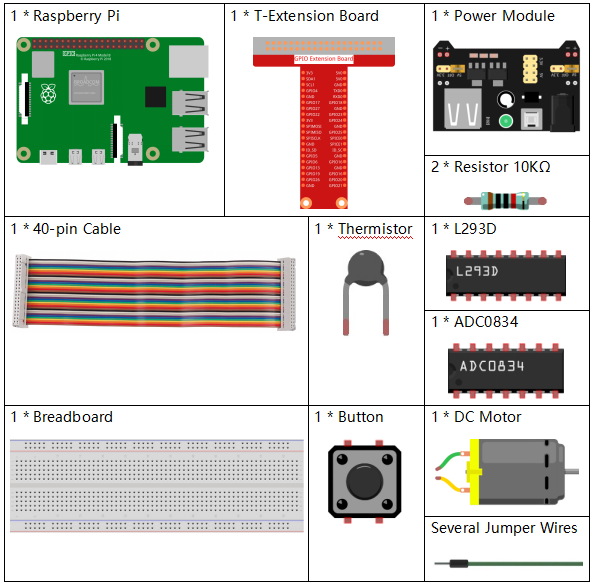
Components
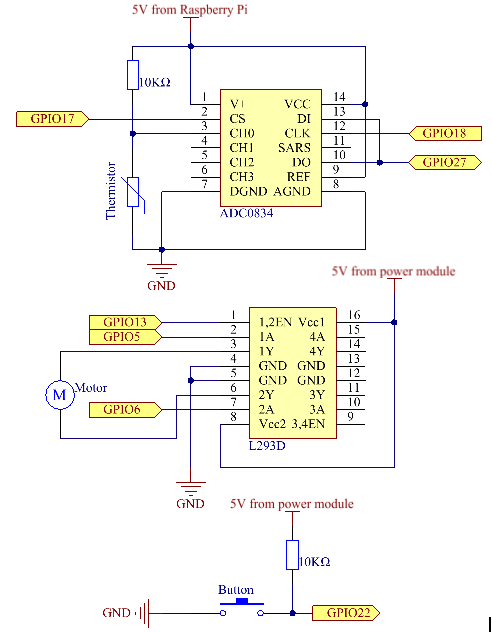
Schematic Diagram
T-Board Name |
physical |
wiringPi |
BCM |
GPIO17 |
Pin 11 |
0 |
17 |
GPIO18 |
Pin 12 |
1 |
18 |
GPIO27 |
Pin 13 |
2 |
27 |
GPIO22 |
Pin 15 |
3 |
22 |
GPIO5 |
Pin 29 |
21 |
5 |
GPIO6 |
Pin 31 |
22 |
6 |
GPIO13 |
Pin 33 |
23 |
13 |
Experimental Procedures
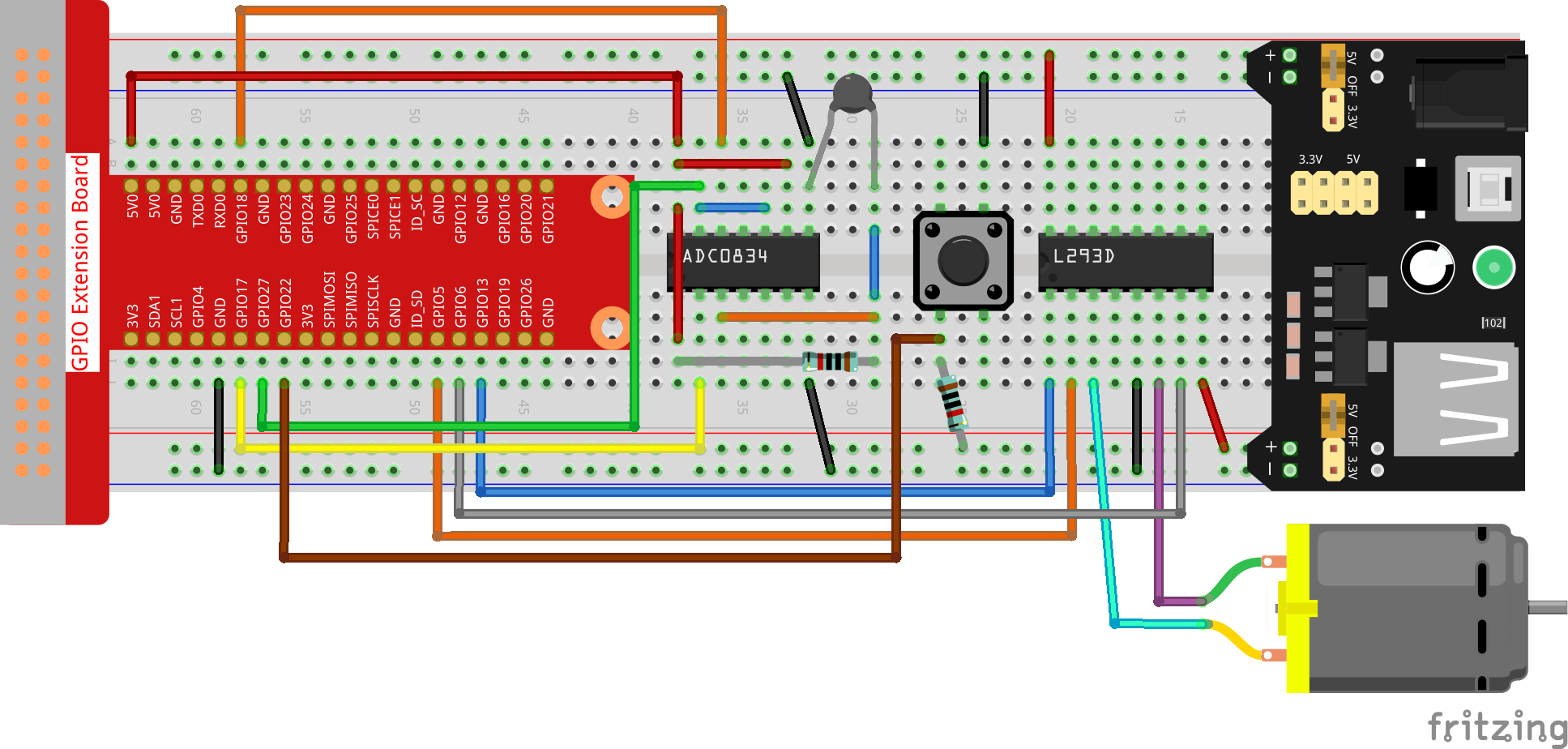
Step 1: Build the circuit.
Note
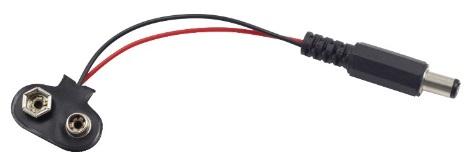
The power module can apply a 9V battery with the 9V Battery Buckle in the kit. Insert the jumper cap of the power module into the 5V bus strips of the breadboard.
For C Language Users
Step 2: Get into the folder of the code.
cd ~/davinci-kit-for-raspberry-pi/c/3.1.4/
Step 3: Compile.
gcc 3.1.4_SmartFan.c -lwiringPi -lm
Step 4: Run the executable file above.
sudo ./a.out
As the code runs, start the fan by pressing the button. Every time you press, 1 speed grade is adjusted up or down. There are 5 kinds of speed grades: 0~4. When set to the 4th speed grade and you press the button, the fan stops working with a 0 wind speed.
Note
If it does not work after running, or there is an error prompt: "wiringPi.h: No such file or directory", please refer to C code is not working?.
Once the temperature goes up or down for more than 2℃, the speed automatically gets 1-grade faster or slower.
Code Explanation
int temperture(){
    unsigned char analogVal;
    double Vr, Rt, temp, cel, Fah;
    analogVal = get_ADC_Result(0);
    Vr = 5 * (double)(analogVal) / 255;
    Rt = 10000 * (double)(Vr) / (5 - (double)(Vr));
    temp = 1 / (((log(Rt/10000)) / 3950)+(1 / (273.15 + 25)));
    cel = temp - 273.15;
    Fah = cel * 1.8 +32;
    int t=cel;
    return t;
}
Temperture() works by converting thermistor values read by ADC0834 into temperature values. Refer to 2.2.2 Thermistor for more details.
int motor(int level){
    if(level==0){
        digitalWrite(MotorEnable,LOW);
        return 0;
    }
    if (level>=4){
        level =4;
    }
    digitalWrite(MotorEnable,HIGH);
    softPwmWrite(MotorPin1, level*25);
    return level;
}
This function controls the rotating speed of the motor. The range of the Level: 0-4 (level 0 stops the working motor). One level adjustment stands for a 25% change of the wind speed.
int main(void)
{
    setup();
    int currentState,lastState=0;
    int level = 0;
    int currentTemp,markTemp=0;
    while(1){
        currentState=digitalRead(BtnPin);
        currentTemp=temperture();
        if (currentTemp<=0){continue;}
        if (currentState==1&&lastState==0){
            level=(level+1)%5;
            markTemp=currentTemp;
            delay(500);
        }
        lastState=currentState;
        if (level!=0){
            if (currentTemp-markTemp<=-2){
                level=level-1;
                markTemp=currentTemp;
            }
            if (currentTemp-markTemp>=2){
                level=level+1;
                markTemp=currentTemp;
            }
        }
        level=motor(level);
    }
    return 0;
}
The function main() contains the whole program process as shown:
Constantly read the button state and the current temperature.
Every press makes level+1 and at the same time, the temperature is updated. The Level ranges 1~4.
As the fan works ( the level is not 0), the temperature is under detection. A 2℃+ change causes the up and down of the level.
The motor changes the rotating speed with the Level.