Note
Hello, welcome to the SunFounder Raspberry Pi & Arduino & ESP32 Enthusiasts Community on Facebook! Dive deeper into Raspberry Pi, Arduino, and ESP32 with fellow enthusiasts.
Why Join?
Expert Support: Solve post-sale issues and technical challenges with help from our community and team.
Learn & Share: Exchange tips and tutorials to enhance your skills.
Exclusive Previews: Get early access to new product announcements and sneak peeks.
Special Discounts: Enjoy exclusive discounts on our newest products.
Festive Promotions and Giveaways: Take part in giveaways and holiday promotions.
👉 Ready to explore and create with us? Click [here] and join today!
4.1.2 Music Player
Introduction
In project 3.1.3 Audio Module, let speaker play a song. Now we add 3 buttons to control the play/pause and volume of the music.
Required Components
In this project, we need the following components.
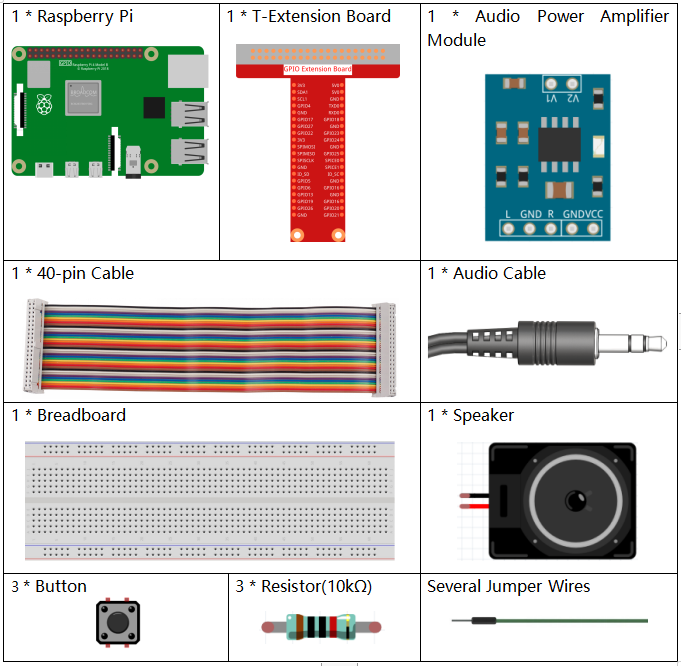
It’s definitely convenient to buy a whole kit, here’s the link:
Name |
ITEMS IN THIS KIT |
LINK |
|---|---|---|
Raphael Kit |
337 |
You can also buy them separately from the links below.
COMPONENT INTRODUCTION |
PURCHASE LINK |
|---|---|
- |
|
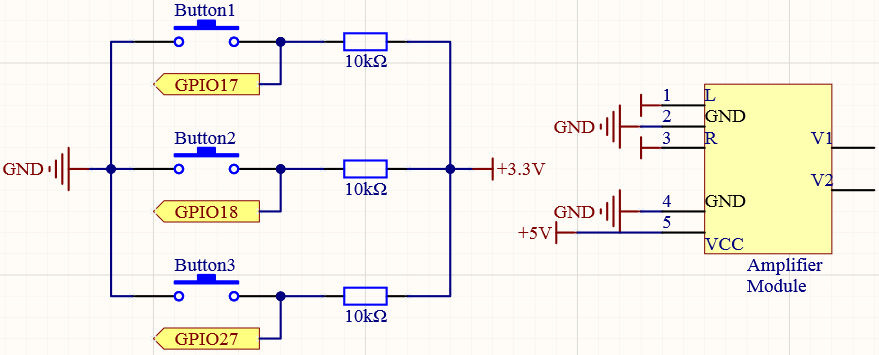
Schematic Diagram
T-Board Name |
physical |
wiringPi |
BCM |
GPIO17 |
Pin 11 |
0 |
17 |
GPIO18 |
Pin 12 |
1 |
18 |
GPIO27 |
Pin 13 |
2 |
27 |
Experimental Procedures
Step 1: Build the circuit.
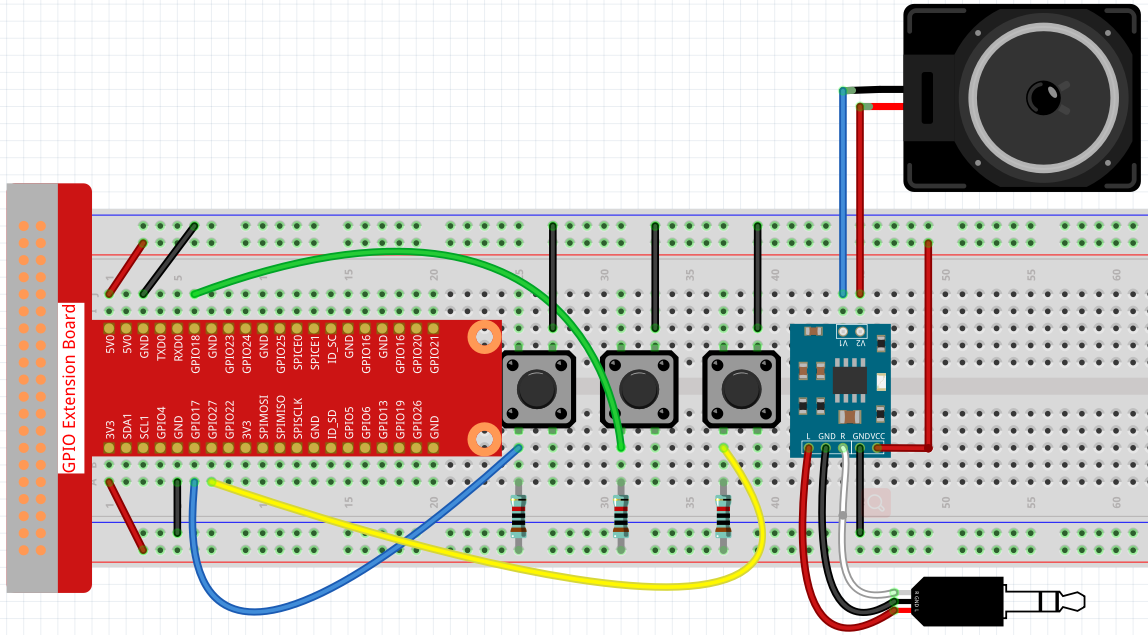
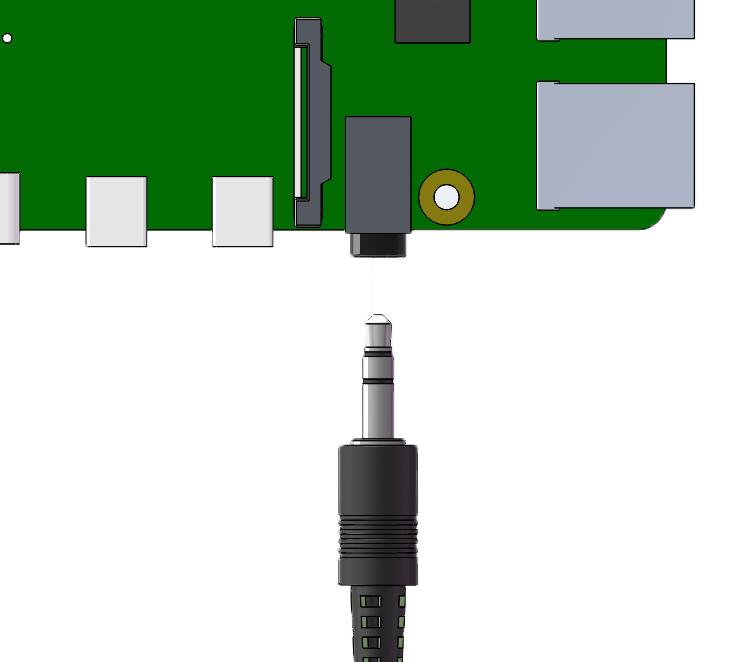
After building the circuit according to the above diagram, then plug the audio cable into the Raspberry Pi’s 3.5mm audio jack.
Step 2: Get into the folder of the code.
cd ~/raphael-kit/python/
Step 3: Run.
python3 4.1.2_MusicPlayer.py
After the code runs, Raspberry Pi will play the my_music.mp3 file in the ~/raphael-kit/music directory.
Button 1 pauses/play the music.
Button 2 decreases the volume.
Button 3 increases the volume.
If you want to upload other music files to Raspberry Pi, you can refer to Filezilla Software.
Code
Note
You can Modify/Reset/Copy/Run/Stop the code below. But before that, you need to go to source code path like raphael-kit/python. After modifying the code, you can run it directly to see the effect.
from pygame import mixer
import RPi.GPIO as GPIO
import time
import os
user = os.getlogin()
user_home = os.path.expanduser(f'~{user}')

BtnPin1 = 18
BtnPin2 = 17
BtnPin3 = 27
volume = 0.7

status = False
upPressed = False
downPressed = False
playPressed = False

def setup():
    mixer.init()
    GPIO.setmode(GPIO.BCM)
    GPIO.setup(BtnPin1, GPIO.IN, GPIO.PUD_UP)
    GPIO.setup(BtnPin2, GPIO.IN, GPIO.PUD_UP)
    GPIO.setup(BtnPin3, GPIO.IN, GPIO.PUD_UP)

def clip(x,min,max):
    if x < min:
        return min
    elif x > max:
        return max
    return x

def play(pin):
    global playPressed
    playPressed = True

def volDown(pin):
    global downPressed
    downPressed = True

def volUp(pin):
    global upPressed
    upPressed = True

def main():
    global volume, status
    global downPressed, upPressed, playPressed
    mixer.music.load(f'{user_home}/raphael-kit/music/my_music.mp3')
    mixer.music.set_volume(volume)
    mixer.music.play()
    GPIO.add_event_detect(BtnPin1, GPIO.FALLING, callback=play)
    GPIO.add_event_detect(BtnPin2, GPIO.FALLING, callback=volDown)
    GPIO.add_event_detect(BtnPin3, GPIO.FALLING, callback=volUp)
    while True:
        if upPressed:
            volume = volume + 0.1
            upPressed = False
        if downPressed:
            volume = volume - 0.1
            downPressed = False
        if playPressed:
            if status:
                mixer.music.pause()
                status = not status
            else:
                mixer.music.unpause()
                status = not status
            playPressed = False
            time.sleep(0.5)
        volume = clip(volume,0.2,1)
        mixer.music.set_volume(volume)
        time.sleep(0.1)

def destroy():
    # Release resource
    GPIO.cleanup()
    mixer.music.stop()

# If run this script directly, do:
if __name__ == '__main__':
    setup()
    try:
        main()
    # When 'Ctrl+C' is pressed, the program
    # destroy() will be  executed.
    except KeyboardInterrupt:
        destroy()
Code Explanation
from pygame import mixer

mixer.init()
Import the Mixer method in the pygame library and initialize the method.
BtnPin1 = 18
BtnPin2 = 17
BtnPin3 = 27
volume = 0.7
Define the pin ports of the three buttons and set the initial volume to 0.7.
upPressed = False
downPressed = False
playPressed = False
UpPressed, downPressed and playPressed are all interrupt flags, the corresponding task will be executed When they are True.
def clip(x,min,max):
if x < min:
    return min
elif x > max:
    return max
return x
The clip() function is used to set the upper and lower limits of input parameters.
GPIO.add_event_detect(BtnPin1, GPIO.FALLING, callback=play)
GPIO.add_event_detect(BtnPin2, GPIO.FALLING, callback=volDown)
GPIO.add_event_detect(BtnPin3, GPIO.FALLING, callback=volUp)
Set the key detection events of BtnPin1, BtnPin2 and BtnPin3.
When
BtnPin1is pressed, the interrupt functionplay()is executed.when
BtnPin2is pressed, the interrupt functionvolDown()is executed.When
BtnPin3is pressed, the interrupt functionvolUp()is executed.
Phenomenon Picture