Arduino
If you are using the PiPower 5 to power your Arduino board, you can connect the Arduino to the PiPower 5’s Type A output port or use two jump wires. Connect the board’s I2C interface using a jumper. If no operation is required before powering off, directly connect the SDSIG jumper cap to the GND. If operations are necessary before shutdown, remove the jumper cap and connect the intermediate wire to an IO port on the Arduino to notify PiPower 5 that it can safely power off.
We provide a library that allows you to monitor input and output voltages, battery voltage and percentage, power source, charging status, and other internal data.
In the Arduino IDE, open the Library Manager, search for
SunFounderPowerControl, and download and install it.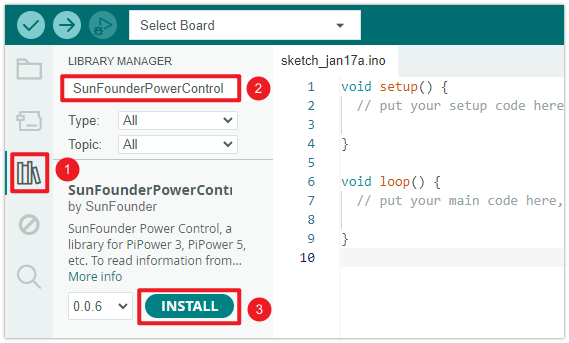
After the installation, you can navigate to File -> Examples -> SunFounderPowerControl -> PiPower 5, where you will find four examples.
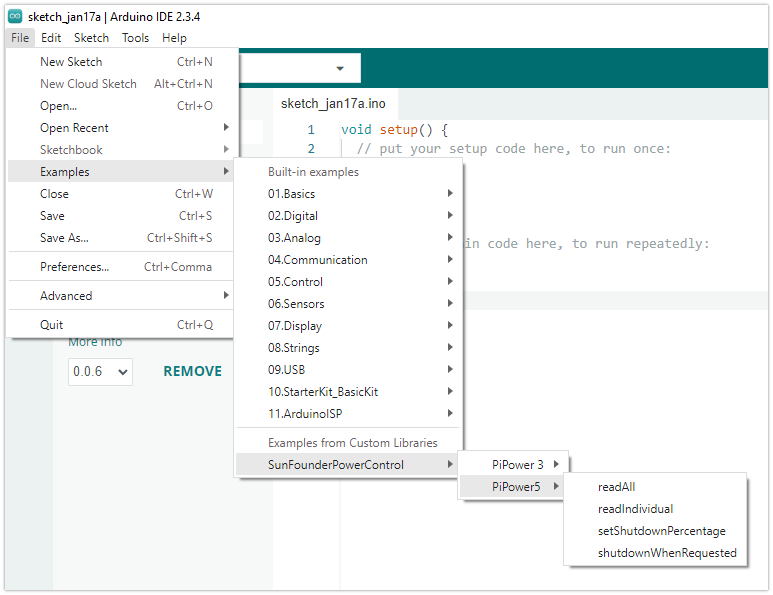
read_all: Use this example if you need to read all data at once and process them individually.read_individual: If you only need to read certain data, this example provides individual data retrieval instructions.set_shutdown_percentage: This example teaches how to set a shutdown battery percentage. This feature sends a shutdown signal to the host when the battery is not charging and falls below the set percentage. After the host shuts down, it will power off only after receiving a power-off signal. Typically used with SBCs like Raspberry Pi. For microcontrollers, remove the SDSIG jumper cap and connect the intermediate wire to a pin. After safely shutting down upon receiving the shutdown signal, pull this pin high to power off PiPower 5.shutdown_when_request: This example shows how to handle operations after receiving a shutdown signal. Remove the SDSIG jumper cap and connect the intermediate wire to a pin.
Choose one of the examples and upload it to your board.
Note
On some boards where I2C can be modified, if you need to change the I2C pins, you need to modify the code
Wire.begin().
Arduino Library API Documentation: https://github.com/sunfounder/arduino_spc?tab=readme-ov-file#api