MicroPython
We provide a library that allows you to monitor input and output voltages, battery voltage and percentage, power source, charging status, and other internal data.
If you are using the PiPower 5 to power your Raspberry Pi Pico or ESP32 board, you can connect the board to the PiPower 5 via the Type-A output port or two jumper wires.
To connect the PiPower 5’s I2C interface, use a jumper. If no operations are needed before shutting down, connect the SDSIG jumper cap directly to the GND pin. If operations are required before shutdown, remove the jumper cap and connect the intermediate wire to an I/O pin on the Raspberry Pi Pico or ESP32 board. This setup notifies the PiPower 5 that the shutdown process is complete and it can safely power off.
Download the library from GitHub. You can quickly download it using the link below or visit: https://github.com/sunfounder/micropython_spc.
After downloading and unzipping, upload the
spcfolder to your Raspberry Pi Pico or ESP32 Board. Thonny is recommended for this purpose.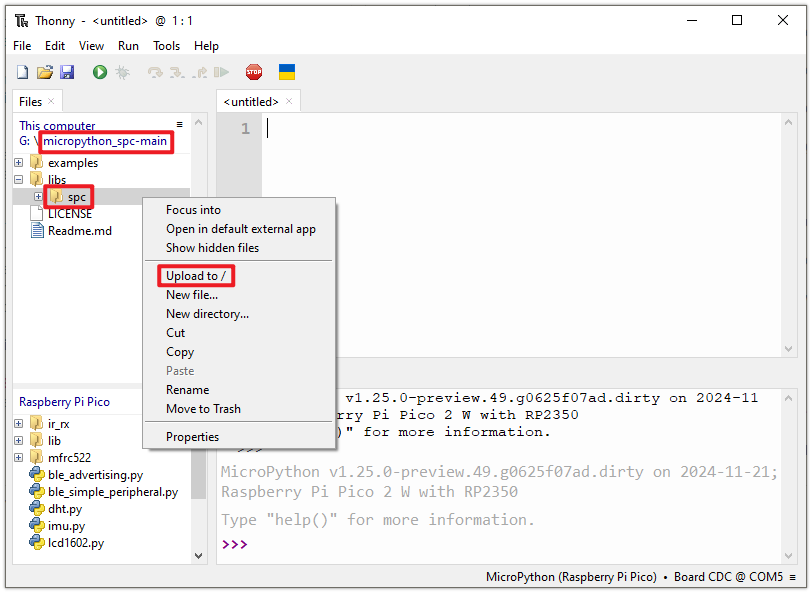
Once the library is uploaded, you can test it using examples provided in the
micropython_spc-main/examples/pipower5folder:pipower_5_read_all.py: Use this example if you need to read all data. It demonstrates how to read all available data at once and process them individually.pipower_5_read_individual.py: This example provides instructions for reading specific data individually. Use it if you only need to access certain data.pipower_5_set_shutdown_percentage.py: This example explains how to set the shutdown battery percentage. When the battery is not charging and its level drops below the specified percentage, the PiPower 5 sends a shutdown signal to the host. It powers off only after the host has completed shutdown and sent back a power-off signal.For SBCs (e.g., Raspberry Pi): No additional configuration is required.
For microcontrollers: Remove the SDSIG jumper cap and connect the intermediate wire to a pin. After receiving the shutdown signal and safely shutting down, pull this pin high to notify the PiPower 5 to power off.
pipower_5_shutdown_when_request.py: This example demonstrates how to handle operations after receiving a shutdown signal. You need to remove the SDSIG jumper cap and connect the intermediate wire to a pin.
Micropython Library API Documentation: https://github.com/sunfounder/micropython_spc?tab=readme-ov-file#api