注釈
こんにちは!SunFounder Raspberry Pi & Arduino & ESP32 Enthusiasts Communityへようこそ!Raspberry Pi、Arduino、ESP32に興味がある仲間たちと一緒に、さらに深く学んでいきましょう。
なぜ参加するのか?
専門家のサポート: 購入後の問題や技術的な課題を、コミュニティやチームのサポートを通じて解決できます。
学びと共有: ヒントやチュートリアルを交換して、スキルを向上させましょう。
限定プレビュー: 新製品の発表に早期アクセスし、先行して情報を得られます。
特別割引: 最新の製品に対して、限定の割引を楽しむことができます。
祝祭プロモーションとプレゼント: プレゼント企画や祝祭プロモーションに参加できます。
👉 私たちと一緒に探求し、創造する準備はできましたか?[ここ]をクリックして、今すぐ参加しましょう!
宝探し
部屋に迷路を作り、6つの異なる色のカードを6つの隅に配置します。その後、PiCrawlerを使って、これらの色のカードを一つずつ探していきます!
注釈
色の検出のために、PDFカラーカード をダウンロードして印刷できます。
コードを実行する
cd ~/picrawler/examples
sudo python3 treasure_hunt.py
画像を表示する
コードが実行されると、ターミナルに以下のようなプロンプトが表示されます:
No desktop !
* Serving Flask app "vilib.vilib" (lazy loading)
* Environment: production
WARNING: Do not use the development server in a production environment.
Use a production WSGI server instead.
* Debug mode: off
* Running on http://0.0.0.0:9000/ (Press CTRL+C to quit)
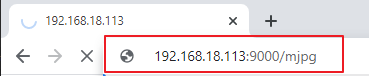
その後、ブラウザに http://<your IP>:9000/mjpg と入力して、動画画面を表示できます。例えば、 http://192.168.18.113:9000/mjpg 。
コード
from picrawler import Picrawler
from time import sleep
from robot_hat import Music,TTS
from vilib import Vilib
import readchar
import random
import threading

crawler = Picrawler()


music = Music()
tts = TTS()

manual = '''
Press keys on keyboard to control Picrawler!
    w: Forward
    a: Turn left
    s: Backward
    d: Turn right
    space: Say the target again
    Ctrl^C: Quit
'''

color = "red"
color_list=["red","orange","yellow","green","blue","purple"]
key_dict = {
    'w': 'forward',
    's': 'backward',
    'a': 'turn_left',
    'd': 'turn_right',
}
def renew_color_detect():
    global color
    color = random.choice(color_list)
    Vilib.color_detect(color)
    tts.say("Look for " + color)

key = None
lock = threading.Lock()
def key_scan_thread():
    global key
    while True:
        key_temp = readchar.readkey()
        print('\r',end='')  # カーソルを行頭に戻す
        with lock:
            key = key_temp.lower()
            if key == readchar.key.SPACE:
                key = 'space'
            elif key == readchar.key.CTRL_C:
                key = 'quit'
                break
        sleep(0.01)

def main():
    global key
    action = None
    Vilib.camera_start(vflip=False,hflip=False)
    Vilib.display(local=False,web=True)
    sleep(0.8)
    speed = 80
    print(manual)

    sleep(1)
    _key_t = threading.Thread(target=key_scan_thread)
    _key_t.setDaemon(True)
    _key_t.start()

    tts.say("game start")
    sleep(0.05)
    renew_color_detect()
    while True:

        if Vilib.detect_obj_parameter['color_n']!=0 and Vilib.detect_obj_parameter['color_w']>100:
            tts.say("will done")
            sleep(0.05)
            renew_color_detect()

        with lock:
            if key != None and key in ('wsad'):
                action = key_dict[str(key)]
                key =  None
            elif key == 'space':
                tts.say("Look for " + color)
                key =  None
            elif key == 'quit':
                _key_t.join()
                Vilib.camera_close()
                print("\n\rQuit")
                break

        if action != None:
            crawler.do_action(action,1,speed)
            action = None

        sleep(0.05)


if __name__ == "__main__":
    main()
仕組みは?
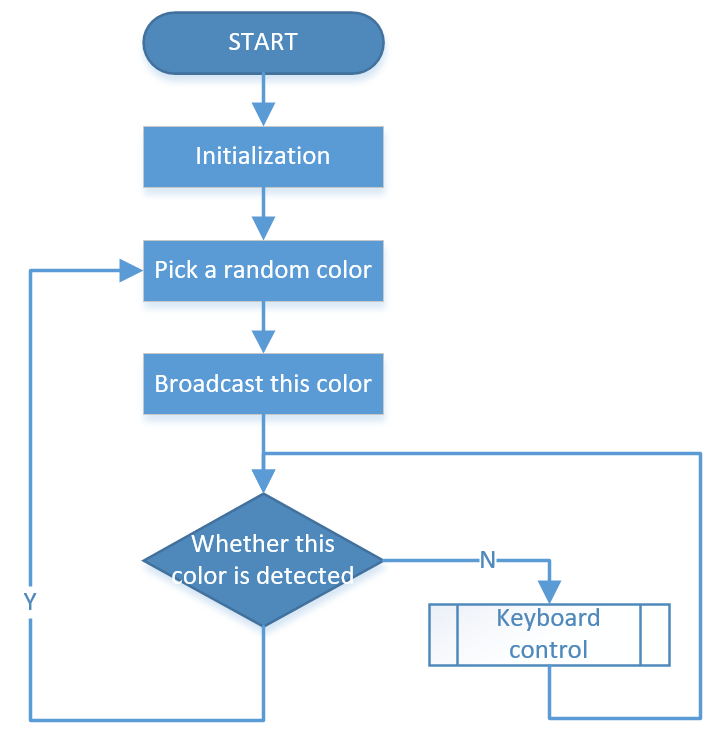
このプロジェクトは、キーボード操作 、コンピュータビジョン 、および:ref:py_sound の知識を組み合わせたものです。
その流れは以下の図に示されています: