Nota
Hola, bienvenido a la comunidad de entusiastas de SunFounder Raspberry Pi & Arduino & ESP32 en Facebook. ¡Explora más a fondo Raspberry Pi, Arduino y ESP32 con otros entusiastas!
¿Por qué unirse?
Soporte experto: Resuelve problemas postventa y desafíos técnicos con la ayuda de nuestra comunidad y equipo.
Aprende y comparte: Intercambia consejos y tutoriales para mejorar tus habilidades.
Avances exclusivos: Obtén acceso anticipado a anuncios de nuevos productos y vistas previas.
Descuentos especiales: Disfruta de descuentos exclusivos en nuestros productos más recientes.
Promociones festivas y sorteos: Participa en sorteos y promociones de temporada.
👉 ¿Listo para explorar y crear con nosotros? Haz clic en [aquí] y únete hoy mismo.
Búsqueda del Tesoro
Organiza un laberinto en tu habitación y coloca seis tarjetas de colores diferentes en seis esquinas. Luego, controla a PiCrawler para buscar estas tarjetas de colores una por una.
Nota
Puedes descargar e imprimir las Tarjetas de Color en PDF para la detección de colores.
Ejecutar el Código
cd ~/picrawler/examples
sudo python3 treasure_hunt.py
Ver la Imagen
Después de ejecutar el código, la terminal mostrará el siguiente mensaje:
No desktop !
* Serving Flask app "vilib.vilib" (lazy loading)
* Environment: production
WARNING: Do not use the development server in a production environment.
Use a production WSGI server instead.
* Debug mode: off
* Running on http://0.0.0.0:9000/ (Press CTRL+C to quit)
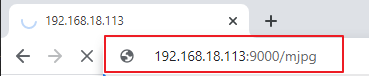
Luego, puedes ingresar http://<tu IP>:9000/mjpg en el navegador para ver la pantalla de video. Por ejemplo: http://192.168.18.113:9000/mjpg.
Código
from picrawler import Picrawler
from time import sleep
    from robot_hat import Music,TTS
from vilib import Vilib
import readchar
import random
import threading

crawler = Picrawler()


music = Music()
tts = TTS()

manual = '''
    Press keys on keyboard to control Picrawler!
        w: Forward
        a: Turn left
        s: Backward
        d: Turn right
        space: Say the target again
        Ctrl^C: Quit
'''

color = "red"
    color_list=["red","orange","yellow","green","blue","purple"]
key_dict = {
    'w': 'forward',
    's': 'backward',
    'a': 'turn_left',
    'd': 'turn_right',
}
def renew_color_detect():
    global color
    color = random.choice(color_list)
    Vilib.color_detect(color)
        tts.say("Look for " + color)

key = None
lock = threading.Lock()
def key_scan_thread():
    global key
    while True:
        key_temp = readchar.readkey()
            print('\r',end='')
        with lock:
            key = key_temp.lower()
            if key == readchar.key.SPACE:
                key = 'space'
            elif key == readchar.key.CTRL_C:
                key = 'quit'
                break
        sleep(0.01)

def main():
    global key
    action = None
        Vilib.camera_start(vflip=False,hflip=False)
        Vilib.display(local=False,web=True)
    sleep(0.8)
    speed = 80
    print(manual)

    sleep(1)
    _key_t = threading.Thread(target=key_scan_thread)
    _key_t.setDaemon(True)
    _key_t.start()

        tts.say("game start")
    sleep(0.05)
    renew_color_detect()
    while True:

            if Vilib.detect_obj_parameter['color_n']!=0 and Vilib.detect_obj_parameter['color_w']>100:
                tts.say("will done")
            sleep(0.05)
            renew_color_detect()

        with lock:
                if key != None and key in ('wsad'):
                action = key_dict[str(key)]
                    key =  None
            elif key == 'space':
                    tts.say("Look for " + color)
                    key =  None
            elif key == 'quit':
                _key_t.join()
                Vilib.camera_close()
                    print("\n\rQuit")
                break

            if action != None:
                crawler.do_action(action,1,speed)
            action = None

        sleep(0.05)


if __name__ == "__main__":
    main()
¿Cómo funciona?
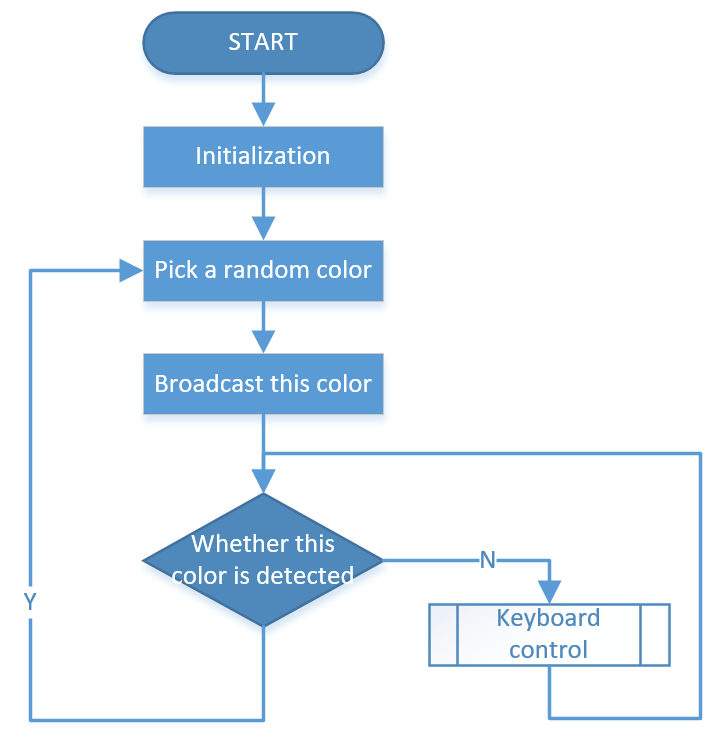
En general, este proyecto combina los conocimientos de Control con Teclado, Visión por Computadora y Efectos de Sonido.
Su flujo se muestra en la siguiente figura: